Helix Telecom has begun a infrastructure modernization project in August, 2026. Documentation, links, instructions and processes related to provisioning equipment, customer portal, voicemail portal, ticket management, SMS, MMS, Fax, softphones, email communications may be incomplete or inaccurate. If you need updated documentation please sign into your account at https://fixmyphonesystem.com and submit a support ticket for assistance.
My phone does not ring.
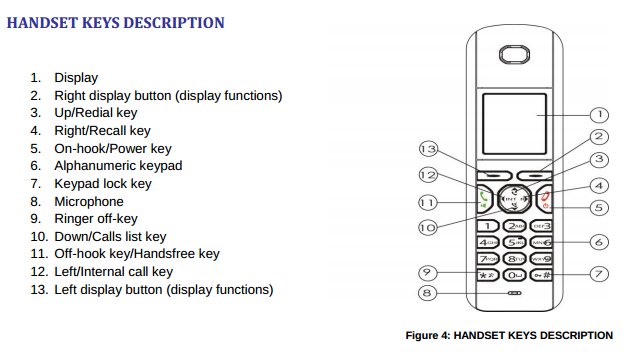
Please see the image below for key information.
The ringer may be silenced. Follow these instructions to restore the ringer volume to factory defaults.
- Press the RIGHT DISPLAY BUTTON (labeled button #2 in the illustration below)
- Press press the DOWN button (labeled button #10 in the illustration below) until you highlight HANDSET on the phone's display
- Press the RIGHT DISPLAY BUTTON (labeled button #2 in the illustration below)
- Press press the DOWN button (labeled button #10 in the illustration below) until you highlight RINGER VOLUME on the phone's display
- Press the RIGHT DISPLAY BUTTON (labeled button #2 in the illustration below)
- Press the UP/REDIAL KEY (labeled button #4 in the illustration below) until VOLUME 5 appears on the display.
- Press the RIGHT DISPLAY BUTTON (labeled button #2 in the illustration below) to save the changes
- Dial the phone's extension from a different handset to test your new volume settings